
 0
 0
What Is a WordPress Child Theme and When Should You Use One?
WordPress offers plenty of customization options that allow website owners to change layouts, colours, typography, and other design elements. However, when you make direct changes to a theme’s original files, those changes can disappear after a theme update. This is where a WordPress child theme becomes useful.
A child theme provides a safer way to customize an existing WordPress theme without modifying its original files. It is particularly helpful for developers, designers, and business owners who want greater control over their website’s appearance and functionality.
What Is a WordPress Child Theme?
A WordPress child theme is a theme that inherits the design, functionality, and features of another theme, known as the parent theme. It allows you to modify specific elements without changing the original theme files.
For example, suppose your website uses the Astra theme. You want to change certain template elements, add custom CSS, or modify some PHP functionality. Instead of editing the original Astra theme files, you can create a child theme and place your customizations there.
The parent theme continues to provide the main website structure, while the child theme handles your additional customizations.
How Does a WordPress Child Theme Work?
A child theme works by inheriting the functionality and styling of its parent theme. WordPress loads the parent theme and applies the child theme’s customizations where applicable.
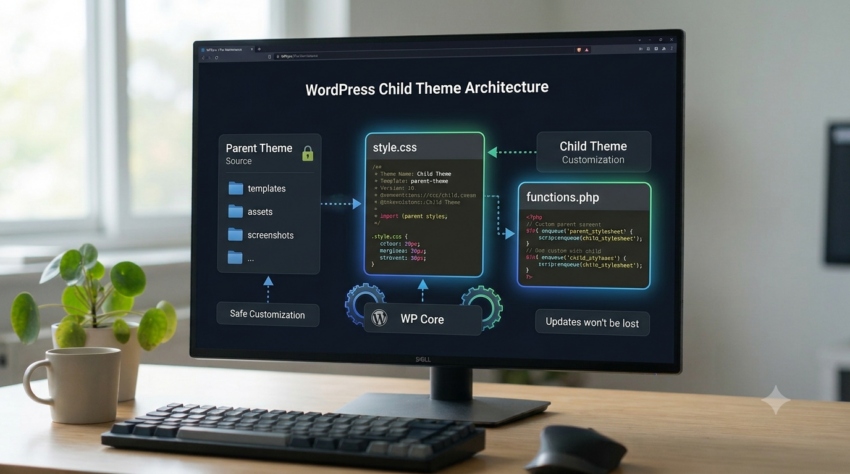
A typical child theme contains a separate folder inside the WordPress themes directory. It usually includes a style.css file and a functions.php file.
The style.css file contains the child theme information and can include custom CSS rules. The functions.php file allows developers to add custom PHP functionality and properly load stylesheets or scripts.
You can also include template files in the child theme to override specific parent theme templates. When WordPress finds a matching template in the child theme, it uses that version instead of the parent theme’s file.
Why Should You Use a WordPress Child Theme?
One of the biggest advantages of using a child theme is that it protects your customizations during parent theme updates.
When developers update a parent theme, its original files may be replaced. If you previously modified those files directly, your changes could be lost.
A child theme keeps custom code separate from the parent theme, making website maintenance easier. It also allows developers to experiment with layouts, styles, and functionality without unnecessarily modifying the original theme.
For websites that require custom PHP functions, template modifications, or extensive CSS changes, a child theme can provide a more organized development environment.
When Should You Use a Child Theme?
You should consider using a child theme when you need to modify PHP files, override existing theme templates, or make customizations that go beyond the options provided by the WordPress theme.
For example, if you want to change the structure of blog posts, customize a theme-specific header, or modify how certain elements are displayed, a child theme can be a suitable solution.
It is also useful when building client websites that require custom functionality and regular theme updates.
However, if you only need to change a few colours, fonts, or basic design settings, using the WordPress Customizer, Site Editor, or a dedicated custom CSS feature may be sufficient.
Child Theme vs Parent Theme
A parent theme is the original WordPress theme that provides the main design, templates, and functionality of a website. A child theme depends on that parent theme and adds custom modifications.
The parent theme receives official updates from its developer, while the child theme preserves your additional customizations separately.
One important consideration is that a child theme depends on its parent theme. If the parent theme is removed or becomes incompatible, the child theme may stop functioning correctly.
How to Create a WordPress Child Theme
Creating a child theme is relatively simple. First, create a new folder inside the wp-content/themes directory. Add a style.css file containing the child theme details, including its theme name and parent theme directory.
Next, create a functions.php file to load the parent and child stylesheets correctly. You can then activate the child theme from the WordPress dashboard under Appearance and Themes.
Before making changes to a live website, create a complete backup and test your customizations in a staging environment whenever possible.
Common Mistakes to Avoid
Avoid editing parent theme files directly because updates may overwrite your changes. Make sure the child theme references the correct parent theme directory, and use proper stylesheet loading methods.
You should also avoid copying unnecessary template files into the child theme. Only override files when you genuinely need to change their behaviour or structure.
Always check compatibility after updating the parent theme, especially when your child theme contains custom PHP code.
Final Thoughts
A WordPress child theme is a useful solution for developers and website owners who want to customize their websites while keeping the original theme files untouched.
It helps organize custom code, protects modifications during theme updates, and provides flexibility for advanced website development. Although a child theme is not necessary for every WordPress website, it is worth considering whenever your customizations require changes to PHP files, templates, or theme-specific functionality.


